
It’s been a while, but I wanted to follow up on the GitHub CLI package together a my previous post, “ Creating a Custom Buildroot Package For Binaries”? We got the binary working perfectly, but I realized we left out something pretty important that your users are going to miss: man pages!
In Linux, you often want to use man <command> to see the related documentation in your terminal. That’s what we’re missing. Without man pages, your users are stuck either remembering command syntax or hunting down documentation online - not ideal when you’re working in air-gapped environments or just want that familiar Unix experience. At the same time, we’re using Buildroot specifically to make a lightweight image, so we may not always want to include those pages with every build. It should be optional.
Today, I’m going to walk you through adding optional man page support to our GitHub CLI package. Don’t worry - it’s not as complex as it might seem, and I’ll explain exactly what we need and why before we dive into the actual implementation. Plus, once you learn this pattern, you can apply it to any package that needs optional content.
Just like the earlier posts, I’ll assume that the directory source contains the external tree with your custom configurations and output contains the generated working code. The main config uses the name MYPROJECT.
What we need and why
Before we start changing any code, let me explain what we’re going to need and why each piece matters. That will make this process easier to understand.
The two key players: groff and man
Here’s the thing about man pages - they’re not just simple text files you can cat to the screen. They need a whole system working behind the scenes to format and display them properly. As a result, we need some runtime components to support our man pages.
groff (GNU troff): Think of this as the formatting engine. Even though the GitHub CLI comes with pre-formatted man pages, this provides the underlying infrastructure that makes the whole man page system work consistently. It ensures that everything displays as expected.
Here’s something important to know: when Buildroot builds
groff, it needs some help from a tool calledm4(a macro processor) during compilation. Unfortunately, it also has a bit of a circular dependency – it needs a version ofgrofffor the build process to build its own man pages. While we could create “host packages”, we’ll keep everything simple and rely on installing those dependencies into our build environment from the OS package manager.1apt install m4 groffman: This is your actual
mancommand - the thing you type in your terminal. It also provides the indexing system that catalogs all your man pages so you can search through them.
In short, man provides the interface and groff provides a way to display formatted content. There is another part to the process – how you browse the contents. For that, you need a tool like less to be available. More on that shortly.
Thankfully, all of these are available with Busybox.
The GitHub CLI
The GitHub CLI already ships with beautifully man pages in its release packages (you’ll find them in the share/man/man1/ directory). Our job is to make sure your Buildroot system has everything it needs to actually use them! You could add these to the existing package, but that means they would always ship with the CLI. Instead, you’ll create a new package for this.
Once you add this package, here’s what your will be able to do:
- Type
man ghand get theghdocumentation - Help for specific subcommands like
man gh-issue - The documentation available on the image for offline use
Time To Build
Now that we understand the highlights, let’s get started!
Step 1: Adding the configuration option
First, we need to give users a choice about whether they want man pages or not. That allows your package to be included only when necessary.
Open up your source/package/ghcli/Config.in file and let’s enhance it:
 1config BR2_PACKAGE_GHCLI
 2    bool "GitHub CLI"
 3    depends on BR2_arm || BR2_aarch64 || BR2_x86_64
 4    select BR2_PACKAGE_CA_CERTIFICATES
 5    help
 6        The GitHub CLI binary
 7
 8        https://cli.github.com/
 9
10config BR2_PACKAGE_GHCLI_MAN_PAGES
11    bool "Install GitHub CLI documentation"
12    depends on BR2_PACKAGE_GHCLI
13    select BR2_PACKAGE_GROFF
14    select BR2_PACKAGE_BUSYBOX
15    help
16        Install man page documentation for the GitHub CLI.
17
18        Enabling this option will add the groff and busybox packages
19        to support man page formatting and display.
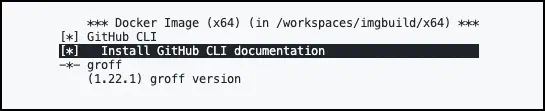
By having a second option in the package, it becomes a selectable component. The depends on makes sure the feature is only available if the BR2_PACKAGE_GHCLI option is enabled. The select statements ensure that the necessary dependencies are included automatically.
It will display like this:
Step 2: Configure Busybox
We required Busybox, but that’s a large package with a ton of features. There’s just a few we really need. Once Busybox is enabled for the project, you can get to its settings with make -C output busybox-menuconfig
Some key items you want to be enabled:
CONFIG_TSORT(Coreutils -> tsort)CONFIG_LESS(Miscellaneous Utilities -> less)CONFIG_MAN(Miscellaneous Utilities -> man)CONFIG_BUILD_LIBBUSYBOX(Settings -> Build shared libbusybox)CONFIG_FEATURE_SEAMLESS_GZ(Archival Utilities -> Make tar, rpm, modprobe etc understand.gz data)CONFIG_SEEDRNG(Miscellaneous Utilities -> seedrng)CONFIG_USE_BB_CRYPT_SHA(Login/Password Management Utilities -> Use internal crypt functions)
When you are done, you can save the settings from the main screen.
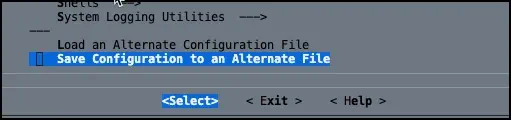
This option lets you save the settings to a file and reference that file from your defconfig. This makes it easier to share those settings and use them as a starting point. These settings typically end up ub a subfolder of boards, but for now we’ll just save it to busybox_minimal.config in boards.
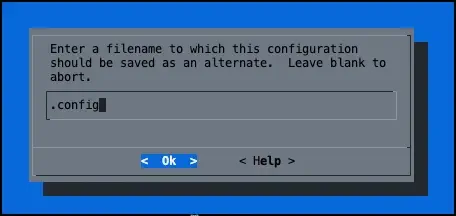
1BR2_PACKAGE_BUSYBOX_CONFIG="$(BR2_EXTERNAL_MYPROJECT_PATH)/boards/busybox_minimal.config"
Step 3: Groff
Turns out this package isn’t available, but if we go back far enough in the Buildroot mailing list, there was a
discussion on that package. We can use that code for a starting point. Create a new folder in package called groff. In that you need two files.
I won't cover it here, you're interested in building a host package for the build component, that's in the list also. Feel free to implement `m4` and `groff` support that way as an exercise to understand the process better.Config.in
 1config BR2_PACKAGE_GROFF
 2   	bool "groff"
 3   	depends on BR2_INSTALL_LIBSTDCPP
 4   	help
 5        Groff (GNU troff) is a typesetting system that reads plain text mixed
 6        with formatting commands and produces formatted output. Output may be
 7        PostScript or PDF, html, or ASCII/UTF8 for display at the terminal.
 8        Formatting commands may be either low-level typesetting requests
 9        (“primitives”) or macros from a supplied set. Users may also write
10        their own macros. All three may be combined.
11
12        http://www.gnu.org/software/groff/
13
14config BR2_PACKAGE_GROFF_VERSION
15   	string "groff version"
16   	default 1.22.1
17   	help
18        The version of groff to use. This is the version that will be
19        downloaded and built.
This adds the menu items needed to enable Groff and its dependency. Since this post is all about configurability, it also adds a small tweak to allow us to specify the groff version in the menu (setting BR2_PACKAGE_GROFF_VERSION)
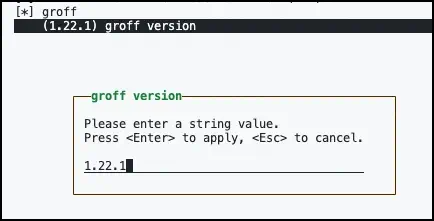
groff.mk
 1################################################################################
 2#
 3# groff
 4#
 5################################################################################
 6
 7GROFF_VERSION = $(call qstrip,$(BR2_PACKAGE_GROFF_VERSION))
 8GROFF_SOURCE = groff-$(GROFF_VERSION).tar.gz
 9GROFF_SITE = $(BR2_GNU_MIRROR)/groff
10GROFF_LICENSE = GPLv3+
11GROFF_LICENSE_FILES = COPYING
12
13# Note: groff calls itself during make install
14# http://lists.gnu.org/archive/html/bug-groff/2009-08/msg00004.html
15GROFF_MAKE_OPTS = GROFF_BIN_PATH=$(HOST_DIR)/usr/bin GROFFBIN=groff
16
17$(eval $(autotools-package))
This configures the actual package. Notice that this sets the version using the user supplied value, stripping any quotes that might exist around the setting.
Project Config.in
As a reminder from the
earlier post, you need to make sure that all packages are referenced from the root Config.in of your project. Just add this to it:
1source "$BR2_EXTERNAL_MYPROJECT_PATH/package/groff/Config.in"Step 4: Updating the Makefile
Now comes the fun part - we need to tell Buildroot how to actually install those man pages when someone wants them. Let’s modify your source/package/ghcli/ghcli.mk file.
Don’t worry if Makefiles look intimidating - I’ll walk you through exactly what each part does:
 1##########################
 2# GitHub CLI (ghcli)
 3##########################
 4
 5# Required configuration settings.
 6# You know now to make this one configurable!
 7GHCLI_VERSION = 2.75.0
 8
 9# Where to find the binary packages
10GHCLI_SITE = https://github.com/cli/cli/releases/download/v${GHCLI_VERSION}
11
12# The name of the binary package
13GHCLI_SOURCE = gh_${GHCLI_VERSION}_linux_${GHCLI_ARCH}.tar.gz
14
15# We need to customize how this is installed since we're working with binaries
16# The implementation must be in a define called GHCLI_INSTALL_TARGET_CMDS
17GHCLI_INSTALL_TARGET = YES
18
19# Determine the architecture target. We need this
20# to populate a variable we have in GHCLI_SOURCE
21ifeq ($(BR2_ARCH), "aarch64")
22    GHCLI_ARCH=arm64
23endif
24ifeq ($(BR2_ARCH), "arm")
25    GHCLI_ARCH=arm64
26endif
27ifeq ($(BR2_ARCH), "x86_64")
28    GHCLI_ARCH=amd64
29endif
30
31# Define the installation process
32define GHCLI_INSTALL_TARGET_CMDS
33    # Write a friendly message
34    $(info Installing GH CLI $(GHCLI_VERSION) for $(GHCLI_ARCH))
35
36    # Copy the pre-compiled binary from the working directory (@D) where the
37    # files are downloaded to the target folder.
38    $(INSTALL) -D -m 0755 $(@D)/bin/gh $(TARGET_DIR)/usr/local/bin/gh
39
40    # Install man pages if enabled.
41    $(if $(filter y, $(BR2_PACKAGE_GHCLI_MAN)), $(call GHCLI_INSTALL_MAN_PAGES))
42endef
43
44define GHCLI_INSTALL_MAN_PAGES
45
46    # Create the folder for the man pages, if it doesn't exist
47    mkdir -p $(TARGET_DIR)/usr/local/share/man/man1
48
49    # Copy the files from the release package into
50    # the folder structure
51    cp -dbfr $(@D)/share/man $(TARGET_DIR)/usr/local/share
52
53    # The pages are expected to be compressed, so compress them!
54    $(info Compressing man pages)
55    find $(TARGET_DIR)/usr/local/share/man/man1 -type f -exec gzip -f {} \;
56
57    # Configure nroff to process the mandocs
58    echo "DEFINE nroff nroff -mandoc" > $(TARGET_DIR)/etc/man.config
59
60    # Remember the dependency we added for less? This is why!
61    # Use less as the pager and remove ANSI formatting sequences in the display.
62    echo "DEFINE pager less -R" >> $(TARGET_DIR)/etc/man.config
63endef
64
65$(eval $(generic-package))
Let me break down what’s happening in that installation section - the man page part is actually pretty elegant:
First, $(if $(filter y, $(BR2_PACKAGE_GHCLI_MAN)), $(call GHCLI_INSTALL_MAN_PAGES)) ensures the man page installation only runs when someone has enabled the option. No option selected? No extra files copied. While this could be done inline, I like refactoring those tasks to a separate define for clarity.
Next, you create the folder structure and copy the files into the appropriate directories. Since the systems expects those files to be compressed, you can use find and gzip to compress each file in place.
Finally, we have to configure the formatting and display components. We specify nroff as the processor for the formatting and less as the pager. Why not more? Partially because I wanted to filter out the ANSI escape sequences in this package. You don’t have to do that, but there’s a bit more effort to make that work.
Time to test
Alright, let’s see this thing in action! Here’s how to test your enhanced package step by step.
First, make sure your file structure looks like this:
  source
  ├── Config.in
  ├── boards
  │   └── minimal_busybox.config
  ├── configs
  │   └── base_defconfig
  ├── external.desc
  ├── external.mk
  └── package
      ├── ghcli
      │   ├── Config.in
      │   ├── ghcli.hash
      │   └── ghcli.mk
      └── groff
          ├── Config.in
          └── groff.mk
Perfect! Now let’s walk through the testing process:
Run make -C output nconfig and navigate to External options. This is where all our custom packages live. You should see the GitHub CLI package listed, along with groff and the man pages option. You can now enable the features!
When you’re ready, run make -C output -j$(nproc) and grab some coffee. The full process may take a few minutes, but it’s totally worth it. Once the image is built, you should be able to start the image and run:
You did it! 🎉
Congratulations! You’ve just transformed your basic GitHub CLI package into a comprehensive, user-friendly installation that provides complete offline documentation. Your users can now:
- Have a tiny image with the GH CLI tool
- Get help for any command without hunting down web documentation
- Work entirely offline with full command reference
- Enjoy the familiar Unix experience they expect from professional command-line tools
Of course, there’s a lot more you can do from here, including further minimizing the Busybox dependencies and crafting host packages. Hopefully you’re starting to get comfortable with some of what Buildroot can do. Even more importantly, you’re learning to build container images and virtual machine images from scratch, with full control over the contents and without having to rely on tools like Docker to do everything for you. The more tools you know, the easy it is to adapt to a situation.
Keep building amazing things and Happy DevOp’ing!