
Last week was busy with the Atlanta Cloud Conference and other activities. As a result, this week you are getting two posts. 😄
In the previous post, I discussed
how to cache tools on your images. That’s not the only frequent download a runner deals with. Each time a job is started, the runner’s first responsibility is to identify all of the Actions required for it to run. Each uses is parsed to identify the owner, repo, and version being requested. If that version is not a SHA, it is resolved to one. Finally, the runner downloads all of the Actions it needs and sets up a folder for each of those. This last step is the focus of today’s post.
If you have thousands of runs, that means you’re running all of those processes thousands of times, downloading the contents of multiple repositories each time. That can push your network consumption (and in extreme cases, might even lead to some rate limiting from the GitHub APIs).
If you review the runner logs, you can often see this happening. For example, this shows actions/checkout@v4 being retrieved and stored in the runner’s temp folder:
 1   [WORKER INFO ActionManager] Request URL: https://api.github.com/repos/actions/checkout/tarball/b4ffde65f46336ab88eb53be808477a3936bae11 X-GitHub-Request-Id: 0402:176F:F19925:13D01E4:66074592 Http Status: OK
 2   [WORKER INFO ActionManager] Save archive 'https://api.github.com/repos/actions/checkout/tarball/b4ffde65f46336ab88eb53be808477a3936bae11' into /home/runner/_work/_actions/_temp_1c9c7acd-7360-455c-8d1c-f1c911dfa451/778dc262-94d4-4c5e-bc64-33b9bd9d6505.tar.gz.
Thankfully, there is a way to optimize this process. Although GitHub services still needed to resolve the specific Actions and SHAs, the repository download can be avoided. Before downloading the repository for an Action, runners first look for a special folder to determine if the required files are locally available.The runner uses the environment variable ACTIONS_RUNNER_ACTION_ARCHIVE_CACHE to discover this folder. That folder contains cached Actions, with the files organized using the naming contention {owner}_{repository}. For example, actions/setup-python becomes actions_setup-python. Multi-part names, such as actions/codeql/init (where the additional parts represent folders) are cached using just the owner and repository. That optimizes the storage since Actions from the same repo will be stored just once.
Each of these Action folders contains files in the form {SHA}.{compression}. The compression format is zip for Windows and tar.gz for Linux. Each file represents a specific Git ref, indicated by the SHA value. For example:
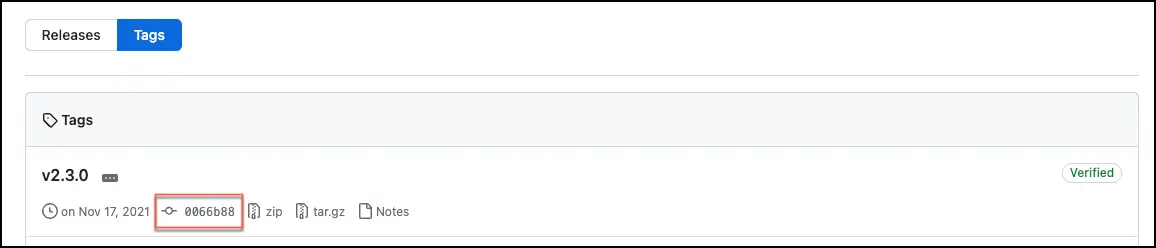
Each of these SHAs represents a specific commit to that repo. For example, you can see the first Python ref here.

This corresponds directly to the tag,
v2.3.0:
If the runner can find the Action and SHA it requires in the cache folder, it will unpack the compressed file rather than downloading a copy from the repository. This can improve the performance of the runner and reduce network activity. GitHub hosted runners take advantage of this. They include the most frequently used Actions (such as actions/checkout and actions/setup-node) on the image. GitHub needs to save costs too, right?
That leads us to the next topic – creating your own cache.
Building a Cache
You could iterate through the tags, download the code, and configure a complete repo by hand. You could use the Repo Content APIs to download archives for specific repository refs. Thankfully, that work has already been done as part of building the GitHub hosted runner images. Those scripts are available from https://github.com/actions/action-versions. We’ll take advantage of that.
First, we need to download those scripts. Then, we need to add Actions to the cache.
  1   - run: |
  2      cd ${{ runner.temp }}
  3      curl -sL -o action-versions.zip https://github.com/actions/action-versions/archive/refs/heads/main.zip
  4      unzip action-versions.zip
  5      cd action-versions-main/script
  6      ./add-action.sh actions/setup-java
  7      ./add-action.sh actions/download-artifact
  8      ./update-action.sh actions/setup-node
  9      ./build.sh
 10      mv ${{ runner.temp }}/action-versions-main/_layout_tarball ${{ github.workspace }}/action-archive-cache
 11      rm -rf ${{ runner.temp }}/action-versions-main
Notice that we call add-action.sh for each Action we want to cache. The script captures all of the available versions, so there’s no need to include a version specifier. This is done so that all of the versions of that Action are available on the runner. All of our top Actions are already prepared as part of this script. If you want to ensure the latest version is available (in case things have changed), call update-action.sh. If the Action is already present, add-action.sh will throw an error to indicate you should use the update process. You can see the list of top Actions
here.
When all of the Actions have been configured, then it’s time to call build.sh to download the packages and create the archive cache folders. Because of the amount of data being transferred, this process can take quite a while and require a surprising amount of disk storage. At the end of the process, two master archives are created: action-versions.tar.gz and action-versions.zip. These archives contain everything needed for our archive. These will be placed in the _layouts folder (in the script above, that means ${{ runner.temp }}/action-versions-main/_layout). That folder will also contain a copy of all of the Actions packages in zip and tar.gz format.
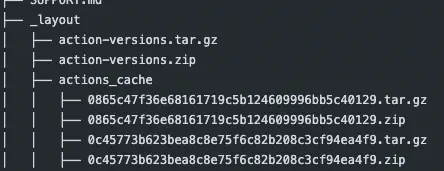
There are also two other folders created. The _layout_zipball folder contains just the structed .zip archives for Windows. The _layout_tarball folder contains the structured .tar.gz archives for Linux. At the end of the script above, I’m moving the Linux folder to make it easy to use with the Dockerfile. If I needed to use multiple runners, then I would use actions/upload-artifact to store the compressed archives for later use.
Finally, I remove all of the files created by this process. This helps to minimize how much space is consumed on the runner. Remember, this process results in quite a few large archive files being created.
The Dockerfile
If you’re using the workflow we built in the last post, you’ll want to modify the Dockerfile for your runner image:
 1   FROM ghcr.io/actions/actions-runner:latest
 2   ENV ACTIONS_RUNNER_ACTION_ARCHIVE_CACHE=/home/runner/action-archive-cache
 3   ENV ACTIONS_TOOL_CACHE=/home/runner/actions-tool-cache
 4   COPY --link --chown=1001:123 tools $ACTIONS_TOOL_CACHE
 5   COPY --link --chown=1001:123 action-archive-cache $ACTIONS_RUNNER_ACTION_ARCHIVE_CACHE
The archive cache folder is created by copying the files from the current workspace. To make it discoverable by the runner, the environment variable ACTIONS_RUNNER_ACTION_ARCHIVE_CACHE is added to the image definition.
It’s important to know that the runner expects to find tar on the system path. This is included in the base image provided by GitHub. If you’re creating your own image, make sure to include tar and gzip.
Putting it all together
If we combine these scripts with the tools cache workflow from the previous post, the results look something like this:
  1on:
  2 # Your triggers here
  3
  4jobs:
  5  create-tool-cache:
  6    runs-on: ubuntu-latest
  7    steps:
  8
  9      ## Remove any existing cached content
  10         - name: Clear any existing tool cache
  11           run: |
  12             mv "${{ runner.tool_cache }}" "${{ runner.tool_cache }}.old"
  13             mkdir -p "${{ runner.tool_cache }}"
  14
  15         ## Run the setup tasks to download and cache the required tools
  16         - name: Setup Node 16
  17           uses: actions/setup-node@v4
  18           with:
  19             node-version: 16.x
  20         - name: Setup Node 18
  21           uses: actions/setup-node@v4
  22           with:
  23             node-version: 18.x
  24         - name: Setup Java
  25           uses: actions/setup-java@v4
  26           with:
  27             distribution: 'temurin'
  28             java-version: '21'
  29
  30         ## Compress the tool cache folder for faster upload
  31         - name: Archive tool cache
  32           working-directory: ${{ runner.tool_cache }}
  33           run: |
  34             tar -czf tool_cache.tar.gz *
  35
  36         ## Upload the archive as an artifact
  37         - name: Upload tool cache artifact
  38           uses: actions/upload-artifact@v4
  39           with:
  40             name: tools
  41             retention-days: 1
  42             path: ${{runner.tool_cache}}/tool_cache.tar.gz
  43
  44   build-with-tool-cache:
  45       runs-on: ubuntu-latest
  46
  47       ## We need the tools archive to have been created
  48       needs: create-tool-cache
  49       env:
  50         # Setup some variables for naming the image automatically
  51         REGISTRY: ghcr.io
  52         IMAGE_NAME: ${{ github.repository }}
  53
  54       steps:
  55
  56         ## Checkout the repo to get the Dockerfile
  57         - name: Checkout repository
  58           uses: actions/checkout@v4
  59
  60         ##############################################
  61         ## Build the tool cache
  62         ##############################################
  63
  64         ## Download the tools artifact created in the last job
  65         - name: Download artifacts
  66           uses: actions/download-artifact@v4
  67           with:
  68             name: tools
  69             path: ${{github.workspace}}/tools
  70
  71         ## Expand the tools into the expected folder
  72         - name: Unpack tools
  73           run: |
  74             tar -xzf ${{github.workspace}}/tools/tool_cache.tar.gz -C ${{github.workspace}}/tools/
  75             rm ${{github.workspace}}/tools/tool_cache.tar.gz
  76
  77         ##############################################
  78         ## Build the Actions archive cache
  79         ##############################################
  80         - run: |
  81             cd ${{ runner.temp }}
  82             curl -sL -o action-versions.zip https://github.com/actions/action-versions/archive/refs/heads/main.zip
  83             unzip action-versions.zip
  84             cd action-versions-main/script
  85             ./add-action.sh actions/setup-java
  86             ./add-action.sh actions/download-artifact
  87             ./update-action.sh actions/setup-node
  88             ./build.sh
  89             mv ${{ runner.temp }}/action-versions-main/_layout_tarball ${{ github.workspace }}/action-archive-cache
  90             rm -rf ${{ runner.temp }}/action-versions-main
  91
  92         ##############################################
  93         ## Build the image
  94         ##############################################
  95
  96         ## Set up BuildKit Docker container builder
  97         - name: Set up Docker Buildx
  98           uses: docker/setup-buildx-action@v3
  99
 100         ## Automatically create metadata for the image
 101         - name: Extract Docker metadata
 102           id: meta
 103           uses: docker/metadata-action@v5
 104           with:
 105             images: ${{ env.REGISTRY }}/${{ env.IMAGE_NAME }}
 106
 107         ## Log into the registry (to allow pushes)
 108         - name: Log into registry ${{ env.REGISTRY }}
 109           if: false
 110           uses: docker/login-action@v3
 111           with:
 112             registry: ${{ env.REGISTRY }}
 113             username: ${{ github.actor }}
 114             password: ${{ secrets.GITHUB_TOKEN }}
 115
 116         ## Build and push the image
 117         - name: Build and push Docker image
 118           id: build
 119           uses: docker/build-push-action@v5
 120           with:
 121             context: .
 122             push: true
 123             tags: ${{ steps.meta.outputs.tags }}
 124             labels: ${{ steps.meta.outputs.labels }}
The end result should be an image that has the latest runner code and cached copies of the tools and Actions that are most frequently needed. Because they are included in the image, the storage will be shared across all of the runners. This helps reduce the storage requirements for your Kubernetes instance.
If you’re building large images (for example, you want to include the CodeQL runtime), you’ll need more space available. At the time of this article, standard hosted runners provide 14 GB of storage. The process of downloading and compressing copies of files will quickly consume this space. If that happens, the larger hosted runners are available and provide 150 GB - 2064 GB of storage.
If you’re wanting to build these images entirely using your own ARC cluster, you will likely need some additional tools. The build scripts utilize multiple command line tools, and not all of those are present on the base ARC image. As a result, you may need to add some CLI applications to your image (at build time or runtime).
The results
Checking the logs from any runner will show the download message is now gone. Instead, the logs show this:
 1   [WORKER INFO ActionManager] Check if action archive 'actions/checkout@b4ffde65f46336ab88eb53be808477a3936bae11' already exists in cache directory '/home/runner/action-archive-cache'
 2   [WORKER INFO ActionManager] Found action archive '/home/runner/action-archive-cache/actions_checkout/b4ffde65f46336ab88eb53be808477a3936bae11.tar.gz' in cache directory '/home/runner/action-archive-cache'
The runner is successfully taking advantage of the Actions archive cache, so those Actions are no longer downloaded.
Happy DevOp’ing!