
Open a new agent session in VS Code and you may see Local and Copilot under Session Target. At first glance, that looks like a choice between keeping work on your computer and sending it elsewhere, but it’s more than that.
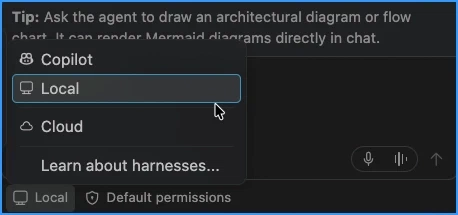
Local is the name of the older VS Code Copilot agent harness. It was the original flavor of Copilot that shipped as an extension to Visual Studio Code and was later integrated directly into the product. Microsoft has deprecated it and plans to remove it in February 2027. The replacement is the modern Copilot harness, built on the Copilot SDK.
That naming can make the transition sound more alarming than it is. It’s a move to using a single, consistent harness across all of the Copilot surfaces. That said, it does impact some of the experience.
The agent runtime
It is tempting to think of an AI coding agent as the model you selected. The model is important, but it is only one participant. Something still has to discover instructions, assemble context, expose tools, request approvals, deliver tool results, and preserve the conversation. That something is the harness.
A harness coordinates several responsibilities:
- Context
- It gathers your prompt, conversation history, instructions, skills, workspace details, and relevant files into requests the model can use.
- Tools
- It decides which editor, terminal, search, MCP, and extension-provided capabilities are available and brokers their calls.
- Approvals
- It applies permission and sandbox rules, then pauses for confirmation when an operation crosses a configured boundary.
- Sessions
- It tracks the conversation, tool activity, state, and the execution host so work can continue across interactions. It may index this information for later retrieval and analysis.
This is why choosing the same model in two harnesses (such as Copilot and Claude) can produce different behavior. The model may receive different context, customizations, or results of user interactions. If you want a deeper view of that activity, you can review its interactions in the Agent Debug Log. That reveals everything that was happening. Note: As of the time of this post, that view is only working when you use the Local harness.
Moving to a shared runtime based on the Copilot SDK enables VS Code to provide automatic improvements to their Copilot experience and consistent behaviors across tools. In fact, all of the Copilot-supported IDEs are moving to this shared runtime to help create a more uniform experience regardless of the editor being used.
It’s all local
The most important clarification: “Local” is a product name, not where the execution happens. It was just the name of the original Copilot version in VS Code, with “Local” distinguishing it from the Copilot Cloud Agent. Interestingly, the Copilot Cloud Agent already uses the Copilot SDK. As a result, it was a completely different harness implementation with different behaviors and configurations. With the move to the shared Copilot SDK runtime, both will share much of the same underlying code.
What changes when you select Copilot
So this just replaces the orchestration layer. It means that instead of completely independent harness implementations, VS Code will share a core engine with the other Copilot-branded products. This does not mean that the tools will behave identically. In some ways, this is similar to building on a common framework, such as React, .NET, or Node: the underlying platform is shared, but each implementation can have its own extensions, configurations, and integrations.
They also explain why migration is not just selecting Copilot and assuming everything followed. Existing prompt files, personal agents, instructions, hooks, MCP configurations, extension tools, and tools may have names or features that relied on features that were unique to the Local harness. Some can be moved automatically, some need conversion, and others require a manual replacement.
VS Code provides a customization migration guide for those differences. From a Copilot session, run Chat: Open Customizations and select Migrations. The interface helps identify next steps required to update your agentic code. After that, it’s important to test how everything behaves. It’s a new harness – make sure to take a moment to validate its features.
The functionality is still in flux. At the time of writing, there are still a number of features that are not fully supported as they move to the shared Copilot SDK runtime. For example, there is no BYOK model support in dev containers. In addition, the Agent Debug Log view is not fully functional – it won’t show any of the model interactions. In some cases, you may have Agents or skills that are not properly discovered or recognized. In GitHub Codespaces, there is also an issue with agent plugin marketplaces – it will refuse to install the plugins. The environment will report that the feature is not supported. However, if you provide the plugin URL directly instead of using the marketplace, the plugin will correctly install and execute.
All of these issues should be corrected before the Local harness is fully retired. Until then, you can continue to use Local when you need these features.
Use the remaining time well
February 2027 is close enough that waiting for removal day is risky, but far enough away to test carefully. The goal is not to prove that Copilot can answer a prompt. It is to establish that the new harness sees the right context, exposes the right tools, enforces the right boundaries, and preserves the workflow your team relies on.
The retirement of Local is ultimately a local runtime transition. It requires some planning and testing to ensure everything continues to function correctly. In the long run, it should provide a more consistent and maintainable experience across the Microsoft and GitHub Copilot products.