
Imagine if your repositories could work with you – build failures investigated and fixed, issues implemented, pull requests reviewed and waiting for your approval. All of it inspectable and completed within security boundaries. GitHub calls this broader approach Continuous AI: the systematic integration of AI into the Software Development Life Cycle (SDLC).
That’s the vision behind GitHub Agentic Workflows, a new technical preview announced by GitHub, in collaboration with GitHub Next, Microsoft Research, and Azure Core Upstream. Instead of writing intricate scripts to handle these tasks, you describe what you want in plain Markdown. An AI coding agent handles the rest, running your tasks in GitHub Actions and applying appropriate guardrails.
My good friend Mickey Gousset drew my attention to this project and its launch today, so I wanted to quickly explore it and share some of the technical details. This approach to repository automation – and the security design – is worth paying attention to, especially for anyone interested in how to build secure AI agentic systems. So, let’s dig into what these workflows actually are, how they work under the hood, and why their security design is worth paying attention to.
What are agentic workflows?
Traditional GitHub Actions workflows execute pre-programmed steps with fixed if/then logic. They do exactly what you tell them, every time, in the same way. Agentic workflows take a fundamentally different approach. You write natural language instructions in Markdown, and an AI coding agent interprets them and uses your repository’s context to make decisions and take appropriate actions.
Like other workflow files, these workflows live in your .github/workflows/ directory. It has two parts. The top section is YAML frontmatter that configures when the workflow runs, what it can access, and what it’s allowed to do. The bottom section is Markdown that describes the task in natural language. Here’s an example that creates a daily status report for repository maintainers in the file .github/workflows/daily-repo-status.md:
  1   ---
  2   on:
  3     schedule: daily
  4     workflow_dispatch:
  5
  6   permissions:
  7     contents: read
  8     issues: read
  9     pull-requests: read
 10
 11   network: defaults
 12
 13   engine:
 14     id: copilot
 15     model: gpt-5.2-codex
 16
 17   safe-outputs:
 18     create-issue:
 19       title-prefix: "[Daily Status] "
 20       labels: [report]
 21       group: true
 22       expires: 7 # auto-close after 7 days
 23
 24   tools:
 25     github:
 26       toolsets: [default, pull_requests]
 27   ---
 28
 29   # Daily Status Report
 30
 31   You are a repository analyst. Your task is to create a daily status report issue that summarizes recent issue and pull request activity, highlighting any important information for maintainers.
 32
 33   ## Goal
 34
 35   Summarize the repository's recent activity and current status in a concise, informative issue to keep maintainers up to date. Highlight:
 36   - Issues opened in the last 24 hours
 37   - PRs and issues that have been open longer than 1 week
 38   - Recommended priority for issues
 39   - Actionable next steps and recommendations for maintainers.
 40
 41   Keep it concise and link to the relevant issues/PRs. Be positive and use emojis!
 42
 43   ## Process
 44
 45   1. Gather relevant issues and pull requests
 46   2. Create a new issue with your findings and recommendations.
Once the file is ready, run gh aw compile, which transforms the .md file into a .lock.yml file – a security-hardened GitHub Actions workflow with schema validation, action SHA pinning, and other protections baked in. Next, you commit both files, and the workflow runs automatically on your defined schedule. You can also run it from the console with gh aw run daily-repo-status.
How they execute
Under the hood, the system supports multiple AI engines. GitHub Copilot is the default, but you can also configure Claude by Anthropic or OpenAI Codex. The engine interacts with your repository through tools exposed via the Model Context Protocol (MCP). Each tool the agent can access is explicitly declared in the frontmatter, so you always know what capabilities you’re granting. You can also use Safe Inputs – special scripts that run in isolation and have controlled access to secrets – to safely extend the agent’s capabilities with custom tools.
Your Markdown is converted into an Actions workflow using gh aw (an open source extension written in Go). The workflow uses a series of Actions steps and jobs to implement the steps, running the agent tasks in sandboxes with strict security boundaries. It uses the provided token to allow those runs to access Copilot, and the GitHub Token (by default) to access the repository and tools.
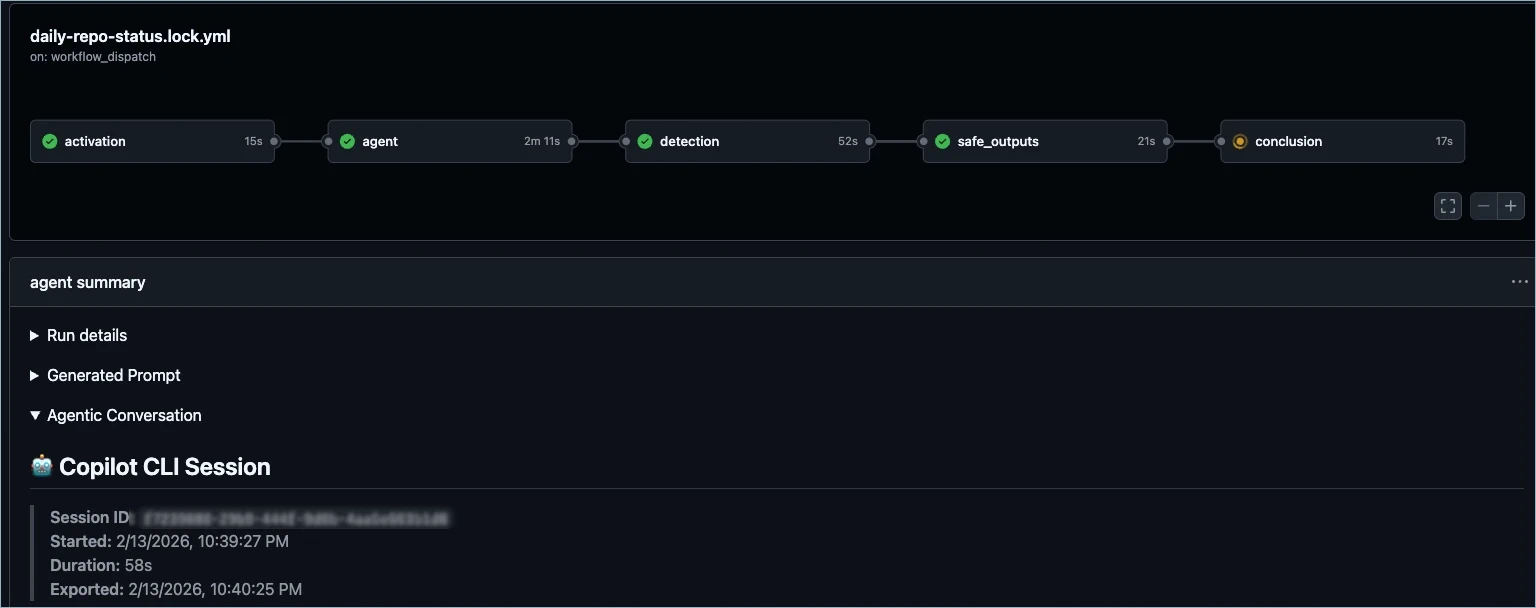
When a workflow triggers, the execution follows a carefully staged pipeline designed to keep the agent’s capabilities tightly controlled:
- Pre-activation
- The system checks role permissions and validates that the lock file matches the source Markdown.
- Input sanitization
- Incoming event content – issue bodies, PR descriptions, comment text – is cleaned before the agent sees it. This includes neutralizing @mentions, protecting against bot loops, converting HTML to safe formats, filtering URLs to HTTPS-only from trusted domains, and enforcing content size limits.
- Agent execution
- The agent runs with read-only permissions. It can read your repository, issues, and pull requests through MCP tools and safe inputs, but it cannot directly write anything. Any actions it wants to take – like creating an issue or opening a pull request – are buffered as structured artifacts rather than executed immediately. This helps prevent the agent from taking any direct write actions if it were compromised or hallucinating.
- Threat detection
- A separate AI-powered analysis job downloads those buffered artifacts and examines them for secret leaks, malicious code patterns, and policy violations. This detection agent runs in complete isolation from the original agent, with its own security-focused prompt. That reduces the risk of one of the inputs compromising the prompt.
- Safe output execution
- Only after threat detection passes do separate, scoped jobs execute the requested write operations – each with the minimum permissions required for that specific action. This isolates the buffered artifacts from the code that updates the repository. This provides deterministic updates without giving the agent direct write access and provides a clear audit trail. By default, there is a special safe output called
missing-datathat encourages agents to explicitly report when they lack the data needed to complete a task, rather than hallucinating an answer. This rewards honest AI behavior and creates a natural feedback loop for improving your agentic workflows.
The key insight here is that the agent itself never gets write access. Even if an agent were fully compromised, it could not directly modify your repository. Every write must pass through the detection pipeline and be executed by a separate, permission-scoped job.
It’s worth mentioning all of this is configurable, including the available engines and the safe outputs. This allows the framework to be adopted to a broad variety of use cases.
The security model
The security architecture is built on the premise that AI agents are most dangerous when they have private data access, untrusted inputs, and external communication channels. To address this, it operates across three trust layers that work together to contain failures.
Substrate-level trust provides the foundation. The agent runs inside a containerized environment on a GitHub Actions runner, with kernel-enforced memory, CPU, and process isolation. The Agent Workflow Firewall (AWF) routes all network traffic through a Squid proxy that enforces a domain allowlist, and each MCP server runs in its own isolated container. These provide some guarantees even if a component is fully compromised and executes arbitrary code. The proxy and firewall are configurable, and they support deep packet inspection of HTTPS traffic.
Configuration-level trust constrains what gets loaded and how components connect. A trusted compiler validates workflow definitions against a strict schema, pins action references to specific SHA hashes (preventing supply chain attacks from tag hijacking), and runs security scanners including
actionlint,
zizmor,
shellcheck, and
poutine. Authentication tokens are treated as imported capabilities whose distribution is explicitly controlled through declarative configuration. You can tighten this further with gh aw compile --strict, which enforces additional constraints like prohibiting write permissions and requiring explicit network configuration.
Plan-level trust constrains behavior over time. The compiler decomposes a workflow into stages, each with defined permissions, data outputs, and rules for how subsequent stages can consume them. Artifacts are created and passed through AI-powered threat detection. After that, separate jobs with scoped write permissions execute the actual changes. The blast radius of any compromise is limited to the stage where it occurs.
Logs
At the end of the run, the gh aw audit <run-id> command can be used to get a detailed report of the workflow run, including recommendations for improvement, job timing, network requests, premium request usage, token counts, and more. This provides you with an audit trail covering the entire process execution.
Costs
When using Copilot with default settings, each workflow run typically incurs 2
premium requests – one for the agentic work and one for the threat detection guardrail. Beyond that, it’s the standard Actions pricing. In addition, the gh aw logs command can summarize the runs, the token counts, and the associated costs.
Getting started
The quick start guide walks you through installing the CLI extension, creating your first workflow, compiling it, and pushing it to your repository. For inspiration, check out Peli’s Agent Factory and some of the design patterns/samples for ChatOps, DailyOps, IssueOps, and Orchestration.
Agentic workflows are an exciting way to enhance your DevOps practices. The combination of read-only agent execution, threat detection gating, and permission-scoped write jobs means you can run these agents continuously with confidence. Being an open source project means that you can see exactly how this was built and learn some advanced techniques for customizing Actions workflows and building secure agentic practices.
Welcome to the brave new world of Agentic DevOps and Agentic SDLC!