
If you’re using custom runner images for GitHub Actions, you’ve probably noticed that workflows using Docker containers can spend a surprising amount of time downloading image layers. What if I told you there’s a simple way to eliminate most of that wait time? Today, let’s talk about pre-caching Docker images onto your GitHub runner custom images.
Understanding the performance problem
When your GitHub Actions workflow uses a Docker container, the runner needs to pull that image before it can execute your job. Docker is smart about this – it uses a layer cache to avoid re-downloading layers that already exist on the system. But here’s the catch: if the runner doesn’t already have those layers, every workflow run pays the penalty of downloading them from the registry.
This adds up quickly. A typical workflow might spend 8 seconds or more just pulling image layers before any real work begins. Multiply that across dozens or hundreds of workflow runs per day, and you’re looking at significant wasted time and bandwidth. If your images are hosted in a cloud provider’s registry, this can also lead to increased egress costs.
The solution: pre-cache during image generation
Here’s the good news: Docker’s layer cache persists on the runner’s file system. This means if you pull an image during your custom runner image generation process, every workflow that uses that runner image can reuse those cached layers. No re-downloading required.
The implementation is surprisingly simple and relies on using GitHub Larger Hosted Runners with custom images. During your custom image build process, just pull the Docker images that your workflows commonly use. For example:
Because the snapshot process captures the file system, these cached layers become part of the custom runner image. When a workflow uses a runner with this custom image, Docker can create containers from those images and skip most (or all) of the download.
How much difference does it make?
Let me show you a real-world comparison. Here’s a workflow pulling an uncached Docker image:
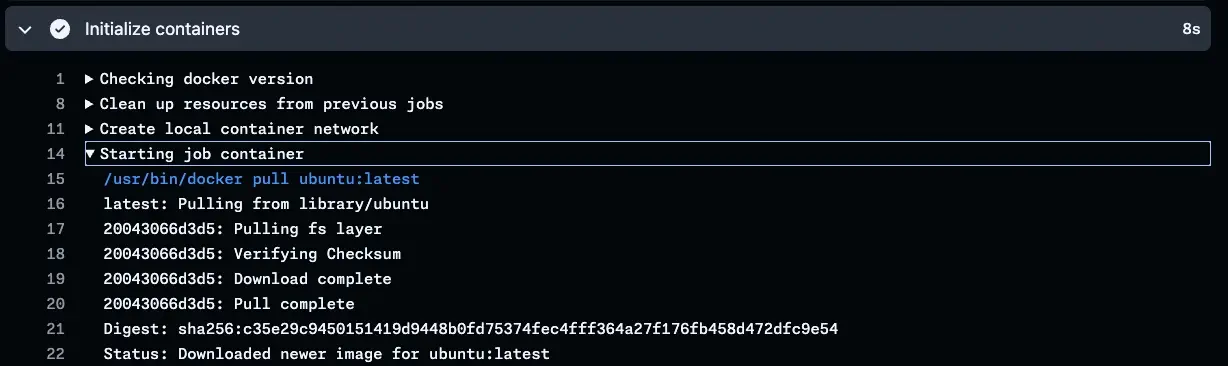
The setup and pull process takes about 8 seconds. Now look at the same workflow using a runner with pre-cached layers:
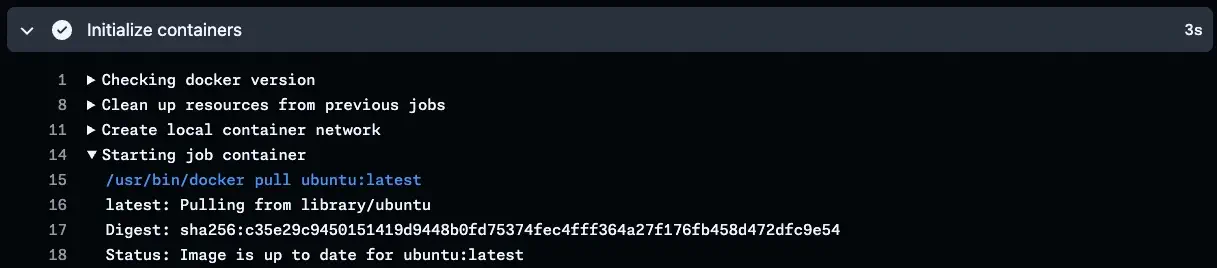
Setup time drops to just 3 seconds because the layers are already present. That’s a 60% reduction in setup time.
Even partial caching helps
You might be thinking, “But what if I can’t pre-cache every image my workflows use?” That’s okay – even partial caching helps. If your cache includes only the base layers of an image, Docker only needs to pull the newer layers for a more recent tag or variant.
For example, if you pre-cache ubuntu:24.04, workflows using ubuntu:24.04 get the full benefit. But even workflows using specialized images based on Ubuntu 24.04 (like many CI/CD tool images) will benefit because they share those base Ubuntu layers. You save time and bandwidth by avoiding the re-download of those common layers.
Practical considerations
When deciding which images to pre-cache, focus on the images your workflows use most frequently. Look at your workflow definitions and identify patterns. Common candidates can include:
- Base operating system images (Ubuntu, Alpine, Debian)
- Database images used in service containers
- Private images hosted in your organization’s container registry
Keep in mind that each cached image adds to the storage footprint, which is fixed for any given runner size. Balance the performance benefits against the storage costs based on your specific needs, and always leave plenty of space for your workload.
Other considerations
If you’re using other systems like self-hosted runners or different CI/CD platforms, the same principle applies. Pre-caching images into your environment can yield similar performance improvements. The layers just need to exist where your container runtime can see them. Unfortunately, this trick doesn’t work with GitHub Actions Runner Controller (ARC) in a Docker-in-Docker setup. Because the Docker daemon runs inside a separate container, it needs extra work to access shared layers.
Also be mindful that any time you cache content, you open the door to cache poisoning. If your build process pulls a corrupted image, your custom runner image will include it. Pull from trusted sources, and consider adding validation steps to your build. I strongly recommend container signing and attestations when you can. Signing helps you detect tampering, while attestations can give you provenance metadata.
The bottom line
Pre-caching Docker images in your custom runner images is one of the easiest performance optimizations you can implement. With a few additional lines in your image build process, you can cut seconds off every workflow run. For teams running hundreds or thousands of workflows daily, those seconds add up to real time and cost savings. And the best part? Unlike many performance optimizations, this one requires almost no code changes or complexity.