
You have a workflow that needs to update a ticket, publish a package, or call an internal API. The service expects a secret, and the obvious solution is to save one as a GitHub secret or put it in a key vault. After that, however, every workflow that needs access becomes another place to distribute, protect, and eventually rotate that credential. You start managing secrets rather than focusing on your code.
There is a better way to connect two systems. You can use OpenID Connect (OIDC) to prove an identity, allowing the identity provider (IdP) to decide whether that particular run should receive access. The IdP can return a short-lived token for the remote service. The same pattern works for standard automation and agent-driven workflows. It even works for private and internal service connectivity!
Proving who it is
In GitHub Actions, OIDC gives a workflow a signed JavaScript Object Notation (JSON) Web Token (JWT) containing claims about its identity and context. A claim is a statement about the workflow, such as its repository, branch or environment, or the event that started the run. The workflow can request this token when its job has the id-token: write permission. It can then use that identity token to request an access token from a relying service. That access token can authenticate requests without relying on a long-lived credential.
If you want more background on how this exchange works, see Understanding OIDC and Identity Federation.
Let systems decide
As part of accepting the request for the token, the remote system evaluates the claims against an access policy. For example, a policy might allow a particular repository’s deployment workflow on a protected production environment to request access to a deployment API. It might even restrict that to particular branches or event triggers, or to particular workflows being invoked from specific, approved repositories.
The important distinction is that OIDC is a just-in-time decision. That is, the remote system evaluates each request individually based on the claims presented before deciding to grant approval. Any approval granted is temporary and narrowly constrained to minimize the risk of misuse. In fact, most Actions that use OIDC will automatically unregister the access token when it is no longer needed to ensure it can’t outlive the job’s lifetime. Allowing a remote system to approve a set of claims creates a more secure, fine-grained access control model compared to distributing long-lived credentials.
There are some common patterns I see when implementing OIDC.
Full OIDC
The IdP can exchange a signed token for a short-lived, narrowly scoped token accepted by the downstream service. The workflow receives that token and uses it directly as if it were the user’s credential. Instead of a single static credential being shared across multiple workflows, each request gets a unique token with a limited scope and lifetime.
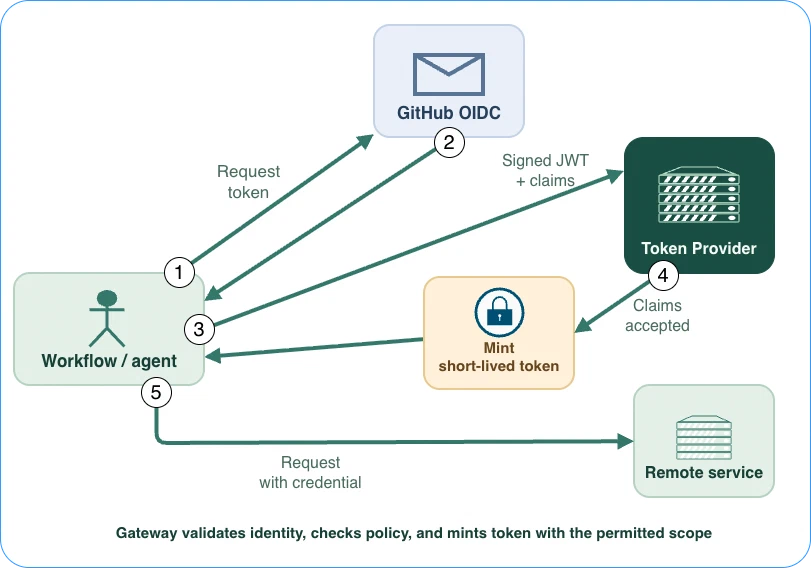
Most cloud platforms support this approach. In addition, it is supported by most API management platforms. For example, Microsoft’s Azure API Management (APIM) can both consume an Entra-provided access token and act as a proxy to the services you are accessing. APIM centralizes both control and logging while providing a way to automate onboarding new services or callers.
This approach keeps the token’s scope and lifetime small, ensures the token is specific to the requesting job and the access it requires, and has numerous built-in safeguards that protect against misuse and unauthorized access. It also makes sure that clients are continuously proving their identity and the access they require rather than simply relying on a static credential.
Direct proxy
Sometimes a downstream service needs one-time access for a single request and provides a gateway. The gateway may not natively support issuing a token, but it can read a JWT and validate its claims. This gateway acts as a proxy endpoint, calling one or more services behind it. The workflow presents its JWT, the gateway system validates the token, and then it calls the remote system using access that it controls or manages.

This means that the proxy gateway validates each request, then creates its own request to the appropriate internal service and returns the results. The proxy is responsible for validating the claims, limiting which operations are available, validating the request parameters, applying rate limits, recording what was requested, and invoking the downstream service to return the results. Like the recommended approach, this pattern avoids the need to use a long-lived credential in the workflow itself or rotate a secret.
On-premises solutions
OIDC is not limited to cloud services. Many network and security products from vendors such as Fortinet, Palo Alto Networks, Cisco, F5, Zscaler, and NetScaler support OIDC integrations, allowing identity-based policies to control access to on-premises devices and services. Exact support varies by product and configuration.
The OIDC exchange itself typically uses HTTPS, but the resulting identity can also control access to non-web services. OIDC tokens can carry custom claims, and authorization responses can include extension fields that a particular client understands. Neither mechanism defines VPN configuration.
For example, an access product could use an OIDC token to authenticate a virtual private network (VPN) client. A vendor-specific integration might provide the VPN endpoint’s IP address and connection settings for a temporary subnet (an isolated network segment) that exposes only selected devices. This VPN configuration is product-specific, not part of OIDC itself. These integrations show how just-in-time identity-based access can extend beyond web services, with their own security considerations.
Create consistent boundaries
An agentic workflow running on Actions executes within a job and has the permissions and network access granted to that job. If it can request an OIDC token and reach the identity provider or proxy endpoint, it can use the appropriate identity-based exchange just like any other workflow. The security benefit comes from the identity provider’s policy or the proxy’s controls, and from limiting what the agent can do with the access it receives, not from the fact that an agent is involved.
For agent tasks, prefer an IdP-issued, short-lived token scoped to the downstream operations the agent needs. Avoid the proxy pattern when the downstream service supports IdP-managed tokens. If you must use a proxy, expose a small set of task-specific operations with strict claim validation, rate limits, and auditing. Keep the token out of the model’s prompt and context: limit which steps can read it, and treat it as a credential that could be misused during its lifetime.
For GitHub Copilot Cloud Agent, you should consider a
copilot-setup-steps.yml to authenticate the job. For GitHub Copilot Code Review, use the same file or tailor the configuration with
copilot-code-review.yml. GitHub Agentic Workflows can use OIDC through a few different mechanisms, including the
Token Broker and support from the various
workflow identity providers. This relies on the standard
workflow permissions; because the workflows run on Actions runners, you can use the built-in features to authenticate to other providers such as Azure or Amazon Web Services (AWS).
Centralize access, not risk
This pattern gives you just-in-time access controls without copying a permanent token into every repository or agent configuration. It can eliminate routine secret rotation for consumers and make onboarding another workflow mostly a matter of defining its permitted capabilities in an identity provider. The identity provider must keep its policies narrow and audit token issuance. A proxy must protect its own credentials, rotate them where appropriate, and audit proxy calls.
Log enough context to answer who requested access and why – for example, the repository, workflow, run, requested capability, and decision – but never log the JWT or access token itself. With those controls in place, a workflow can get the access it needs for one run without becoming the new home for a shared, long-lived secret.