
If you’ve been working with AI assistants lately, you’ve probably noticed something fascinating and occasionally frustrating: they’re remarkably capable, yet fundamentally unpredictable. Ask the same question twice, and you might get two different – but equally valid – answers. That’s the nature of Large Language Models (LLMs). They’re designed to be creative, generating novel responses by predicting likely text patterns. This non-determinism is a feature, not a bug, but it creates an interesting challenge when you need your AI assistant to work with real-world data.
The AI can write beautiful code, explain complex concepts, and help solve problems creatively. But if you need it to check your database for the actual customer record, read your internal documentation for the correct procedure, or call your company’s API to get the current inventory count, it simply can’t. Tasks that require accurate, consistent, real-world information need a bridge between the AI’s creative reasoning and your deterministic systems.
That’s where the Model Context Protocol (MCP) comes in.
The problem MCP solves
Imagine you’re chatting with an AI assistant about a bug in your application. It recognizes the issue may come from data in a table in the database. By itself, AI can’t actually look that up – it doesn’t have access to your database. Using schema details from your code, it suggests a query. Now you become the middleman: you run the query, copy the results, and paste them into the chat. Every time you need fresh information, you repeat this dance.
This back-and-forth isn’t just tedious; it’s fundamentally at odds with how we want AI assistants to work. You’re providing deterministic data (exact records from a database) to feed into a non-deterministic system (the AI’s reasoning). The AI might brilliantly analyze the data you provide, but it only knows what it was trained on and whatever context you share with it.
Reading records, querying monitoring systems, and calling APIs are all deterministic operations – given the same inputs, they return the same outputs. This determinism is exactly what you need to ground the AI’s creative reasoning in reality or to perform precise actions. That’s exactly what MCP provides. It gives AI assistants a standardized way to connect to deterministic data and actions – all while keeping you in control of what’s accessible.
What is MCP?
Model Context Protocol is an open standard developed by Anthropic that defines how AI applications (like chatbots, coding assistants, and agents) can communicate with external servers that provide additional capabilities. Think of it as a universal adapter that lets any AI assistant plug into any compatible data source or tool.
The protocol itself is simple: it’s just JSON-RPC messages exchanged over one of several standard transport mechanisms. An MCP server can be a command-line application that communicates via stdin/stdout, or it can be a web server using Streamable HTTP. This simplicity means you could technically write an MCP server in almost any language – even a bash script!
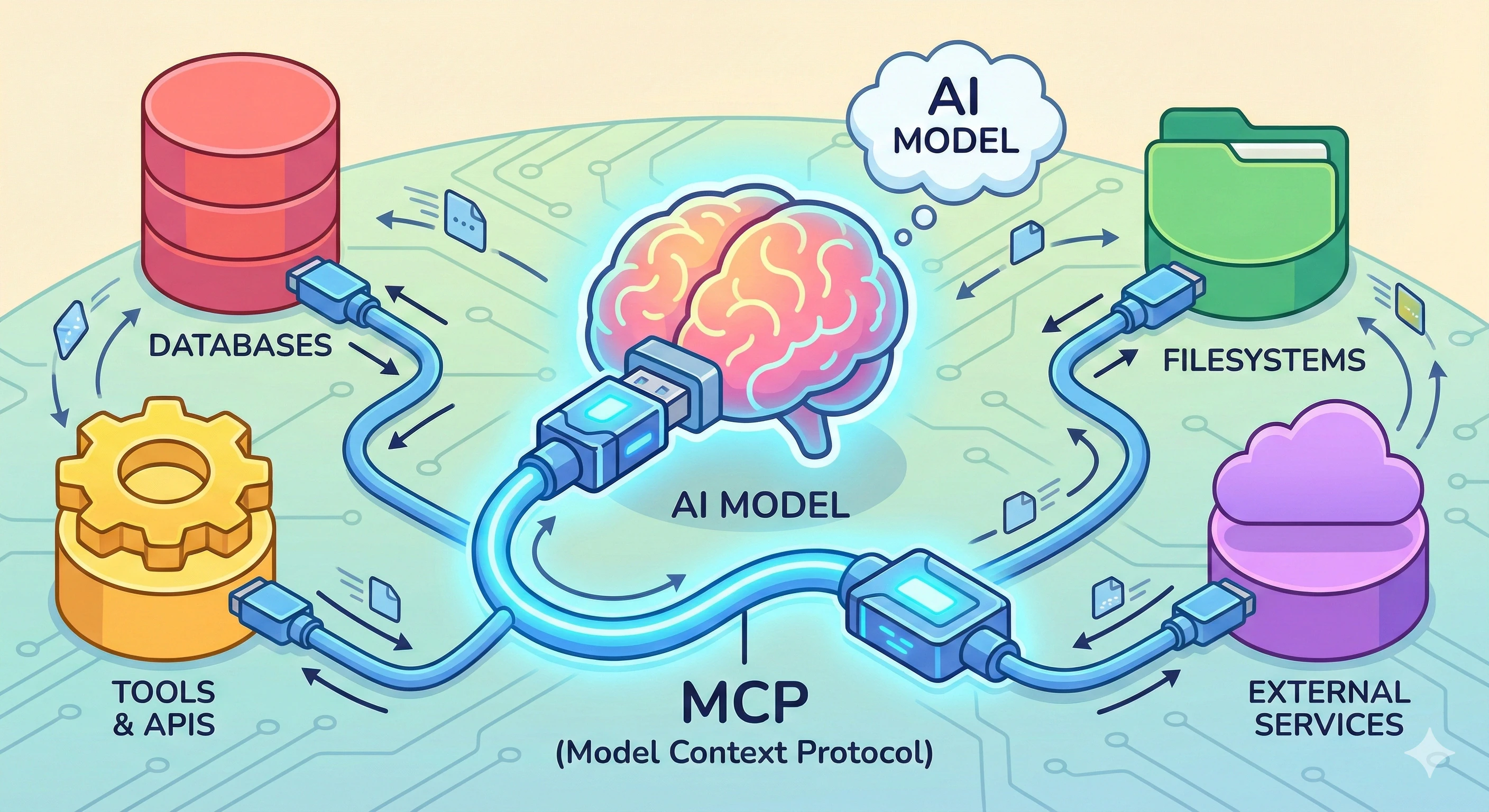
The building blocks of MCP
When an MCP server is first called – initialized – it tells the AI client about the capabilities it provides. The AI client can then expose those capabilities to the user in whatever way makes sense for the application. In addition, the MCP server can notify the client when capabilities change, ensuring the AI always has an up-to-date view of what features it can access. There are three primary types of capabilities MCP servers can provide: resources, prompts, and tools.
Resources
These are data sources that can provide content to add to the context. The data is selected by the user, then attached to the context. Examples include database query results, file contents from a repository, documentation pages, or paged API data. Resources are identified by URIs and can be filtered to return specific subsets of data. Resources are queried and added as JSON directly to the AI’s context – they become part of what the model “knows” for a given conversation.
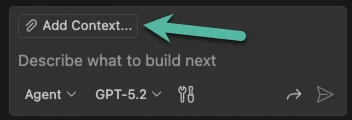
In VS Code, resources are accessed by clicking the “Add Context” button in the Copilot Chat pane:
This allows the user to then select from the available MCP resources:
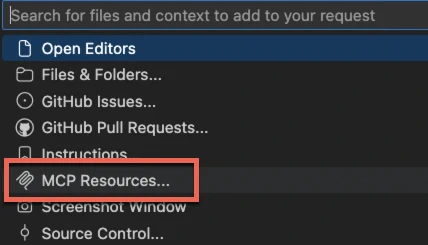
From there, the user can select specific resources (organized by tool) to add to the conversation context.
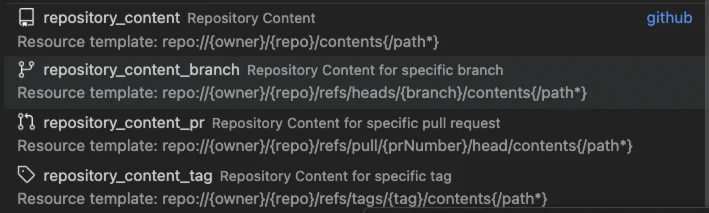
Because resources are exposed as a URI, they can represent anything that can be identified that way. This lets them return a list of structured data. In addition, it can prompt the user for specific parts of the resource URI, filtering and refining what data will be returned. For example, GitHub’s repository_content_branch resource provides a resource template that lets you specify the repository, branch, and path to return specific file contents from a GitHub repository:

Prompts
Prompts are pre-defined templates that help guide the AI’s behavior for specific tasks. They’re reusable instructions that can accept parameters. Prompts perform specific tasks, such as analyzing code with specific security guidelines, generating documentation in a particular format, or troubleshooting issues in your environment using detailed instructions. Prompts help ensure consistency and encode best practices directly into a conversation. In many ways, you can think of prompts as a macro that gets expanded into instructions in your chat session.
In VS Code, prompts appear in the prompt picker any time you type a / in Copilot Chat:

Tools
Tools are actions that the AI can execute to interact with systems and data. Unlike resources (which provide read-only context), tools can perform operations that modify data. Examples include running a database query, creating or updating files, sending notifications, deploying code, or interacting with APIs. This is how Copilot Chat can run code, call the command prompt, update files, and interact with your system.
Tools can be directly invoked or referenced in VS Code using the # syntax in Copilot Chat:
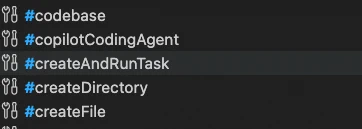
Tools have an additional behavior. When AI needs more information or needs to perform an action, it evaluates that against the list of tools (and their descriptions) made available from the MCP servers. If the AI decides that a tool is relevant to the current conversation, it can choose to invoke the tool directly. This distinction between resources and tools is important: resources are user-selected details that are added to the context, while tools grant the AI an ability to perform actions or retrieve data at its own direction. Both approaches provide deterministic data from your systems, complementing the AI’s creative but non-deterministic reasoning.
Other notable features
MCP actually supports a few more advanced capabilities that are worth mentioning. The first is sampling. Sampling allows an MCP server to request LLM completions from the client. This enables agentic behaviors where your MCP server can ask the AI to generate text, analyze content, or make decisions as part of a larger workflow. The client maintains control over model access and permissions, but your MCP server gains the ability to use those AI capabilities. For example, an MCP server could implement a multi-step process where it queries for a set of matching data, asks the AI to pick the best result, and returns only that result to the user. The MCP server’s request goes through the AI client to the LLM, and it does not get access to any configured tools or local resources.
The other advanced capability is MCP Apps. Apps are a recent addition to the specification that allows an MCP server to return an HTML application that runs within a sandbox in the AI client, providing a rich interactive experience. Apps can have their own UI components that leverage the MCP resources, prompts, and tools to provide a seamless experience. For example, they can let you interact with the agent to assign a user to a task, fill out a form, or craft charts which explore data visually. Apps are still an emerging capability, but they open up exciting possibilities for building rich interactions directly within AI assistants.
MCP also supports notifications, which enable real-time updates. When the list of available tools or resources changes, servers can notify clients automatically without waiting for the client to poll for updates. This keeps everything synchronized and responsive.
A peek under the covers
One of the most appealing aspects of MCP is its simplicity. At its core, the protocol is just JSON-RPC 2.0 messages. For example, a request to invoke a tool may look something like this:
And the response is equally straightforward:
This simplicity has a powerful implication: you can write an MCP server in virtually any programming language. If it can read and write JSON, it can be an MCP server. The simplicity also means that AI agents like Claude and Copilot can easily actually implement MCP clients.
Want a quick proof-of-concept? As I mentioned before, you could literally write one in Bash using jq! Here’s a minimal example that responds to the initialization handshake:
 1   #!/bin/bash
 2   while IFS= read -r line; do
 3     method=$(echo "$line" | jq -r '.method // empty')
 4     id=$(echo "$line" | jq -r '.id // empty')
 5
 6     if [[ "$method" == "initialize" ]]; then
 7       echo '{"jsonrpc":"2.0","id":'"$id"',"result":{"protocolVersion":"2024-11-05","capabilities":{},"serverInfo":{"name":"bash-mcp","version":"1.0.0"}}}'
 8     fi
 9   done
Of course, the easiest way to craft an MCP server is to use one of the official SDKs. These are provided for many popular languages including Python, TypeScript, Java, C#, and more. You can find the complete list at the MCP SDK documentation. You’ll even find plenty of samples for how to build your own using the SDK. The SDKs parse the JSON, implement error checking, and make it easier to implement the latest version of the standards.
Advancing your AI
The Model Context Protocol shines whenever AI needs deterministic results or a way to interact with external systems. By providing a standard protocol for connecting AI assistants to data sources and tools, MCP unlocks a new level of usefulness for AI in professional settings. It represents a significant step toward making AI assistants (and general AI) truly useful in professional environments. By providing a standard way to extend AI capabilities, it lets developers focus on solving real problems rather than building custom integrations. And with its simple, JSON-based design, the barrier to entry is remarkably low.
Whether you’re building a quick utility or a full-featured integration, MCP provides the foundation you need to give AI assistants the context they deserve.