
In the previous post, you saw how agent debug logs reveal what an AI agent actually did versus what you expected. One key takeaway was that AI agents are non-deterministic – the same prompt can produce different execution paths on different runs. In this post, you’ll look at one practical consequence of that non-determinism: asking the model to produce a numeric score.
The pattern that looks reasonable
You’re building a triage workflow. Issues come in, and you want to rank them by priority so your team knows what to tackle first. You write a prompt like this:
1Score this issue from 1-10 based on the following criteria:
2- Impact: How many users are affected? (1=single user, 10=all users)
3- Urgency: How time-sensitive is the fix? (1=cosmetic, 10=data loss)
4- Risk: What's the blast radius if we don't fix it? (1=contained, 10=cascading)
5
6Final score = (Impact × 0.4) + (Urgency × 0.35) + (Risk × 0.25)
You hand it an issue description. The model thinks carefully, assigns sub-scores, applies the formula, and returns 6.8. Looks great.
You run it again on the exact same issue. This time: 5.2. The next run: 7.5. The criteria didn’t change. The input didn’t change. But the score swings by 40% between runs.
Why the numbers don’t stabilize
Three things conspire to make model-generated scores unreliable.
First, the reasoning path changes every run. As discussed in the context of multiple subagents, models sample from probability distributions. That means the same prompt can produce different internal reasoning chains. One run might emphasize the word “all” in the issue description and rate impact highly. The next run might focus on “workaround available” and rate urgency low. Different reasoning chains produce different sub-scores, which then produce different final numbers.
Second, models are trained on language, not arithmetic. When you write (Impact × 0.4) + (Urgency × 0.35) + (Risk × 0.25), the model does not reliably evaluate that expression like a calculator. It predicts likely tokens based on its reasoning. Sometimes that prediction matches the right math. Sometimes it does not. The errors are usually small and inconsistent – off by 0.3 here, rounded differently there – but they compound with the first problem. While newer models with tool-use improve arithmetic, results still vary when subjective criteria and math are combined.
Third, the model may not use the same strategy each run. On one pass, it might reason through each criterion step by step. On another, it might decide the criteria are subjective and pick a “gut feel” number. On a third, it might write a Python script, execute it, and return that result. You can sometimes see these strategy changes in agent debug logs. They can all happen for the same prompt.
The result: scores that are not comparable across runs. You cannot rank Issue A (scored 6.8 on Tuesday) against Issue B (scored 5.2 on Wednesday) because the scoring mechanism was different each time. You cannot debug a single bad score because you cannot reproduce the reasoning that produced it.
It can’t happen to me
I’ve had a lot of people push back on this point. They’ll say “I don’t see any problem” or “the scores seem fairly consistent to me.” Granted, sometimes you will get good results – especially with smaller scoring ranges or less ambiguous criteria. Newer frontier models appear to use tools that improve accuracy when reasoning about some kinds of data, including math and dates. They are getting better at these tasks over time.
However, this does not always work. For example, I asked a model to compare some numbers from two different time periods. I prompted it to compare the data for the current week (starting on Monday, ending today) to the same days the previous week. It then reasoned the following:
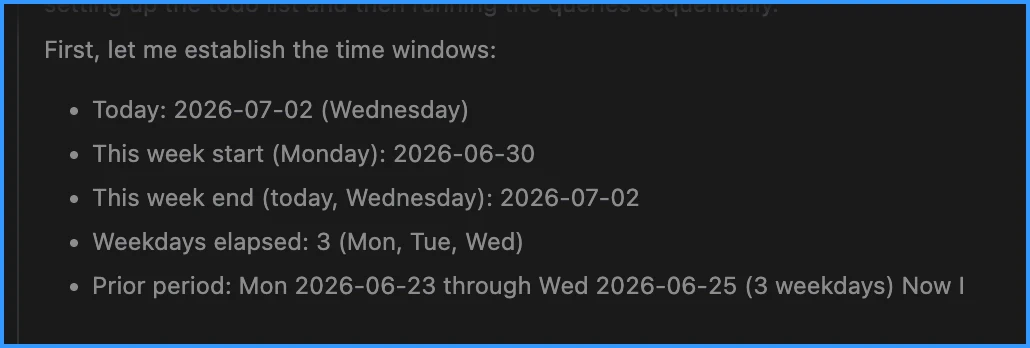
See the problem? Don’t feel bad if you don’t – it’s easy to miss.
The model needed to know “today”. With a model, that information can only come from one of two places – a tool that provides the details or the model itself (a hallucination). The model correctly identified the current date as July 2, 2026. However, it reasoned (hallucinated) that date was a Wednesday, when it was actually a Thursday – a subtle error that shows how reasoning paths can diverge. That led it to reason that it was comparing three days instead of four. This example illustrates a broader risk: small reasoning variations can compound into different conclusions.
Next, it reasoned it needed the same three days from the previous week. It picked the correct three dates from the previous week. However, it misidentified them as Monday, Tuesday, and Wednesday instead of Tuesday, Wednesday, and Thursday.
If you aren’t paying attention to that reasoning, you might not realize that the model is comparing the wrong days and mislabeling the days of the week. In my case, I had criteria that were simple enough to make identifying the right days easy. Now consider the scoring request I described earlier, where the model is asked to reason about impact, urgency, and risk.
The criteria are very subjective. There is nothing specific about how it should define those numbers. It’s not likely to have better results than I had with the date comparison. In fact, the model will likely produce different reasoning chains each time, and those chains will produce different scores.
What you actually need
When scoring is part of a workflow – triage, prioritization, risk assessment, compliance checks – you need three properties that models cannot provide on their own:
- Reproducibility – same inputs must produce the same output
- Comparability – scores from different runs must use the same calculation
- Debuggability – when a score is wrong, you need to trace which rule produced the error
These are the properties of deterministic code, not probabilistic content generation.
The fix: let AI design the logic, then run it as code
Instead of asking the model to produce a score, ask it to write a scoring function. The model is excellent at translating human criteria into structured logic. It’s also good at helping you to examine edge cases to make that logic more reliable. It is only unreliable when it is asked to perform the logic itself.
Here’s the workflow:
- Describe your scoring criteria to the model in natural language – the same rubric you’d put in a prompt.
- Ask it to generate a script (Python, TypeScript, whatever fits your stack) that takes structured inputs and returns a score. I recommend also providing a
--helpoption that prints the expected inputs and details about what will be returned. If the inputs are not provided, invoke this option automatically. - Review the script. Test it against known inputs. Consider creating unit tests – it’s code!
- Add an instruction or skill that explains how to execute the script and what values to pass.
- Run the script from your agent workflow using a hook (deterministic inclusion) or a tool call (model reasoning).
A hook means your workflow always runs the script at a specific point without asking the model to choose. A tool call means the model decides when to run the script based on your instructions.
The script might look something like this:
 1def calculate_impact(issues: list[str]) -> int:
 2    """Map an array of issue descriptions to an impact score (1-10)."""
 3    # This score calculates the impact by using the number of issues
 4    # as a proxy for how many users are affected. More issues = higher impact.
 5    # Return 1 for each issue, up to a maximum of 10.
 6    return min(len(issues), 10)
 7
 8# : More functions ...
 9
10def score_issue(impact: int, urgency: int, risk: int) -> float:
11    """Score an issue on a 1-10 scale based on weighted criteria."""
12    return round((impact * 0.4) + (urgency * 0.35) + (risk * 0.25), 1)
Now every run produces the same output for the same inputs. If the score is wrong, you fix the formula in the script – not your prompt. If the weights need adjusting, you change the code and every future run benefits. The model can still help you refine your criteria. For example, “1=single user; 10=multiple users” is ambiguous. How do you determine impact for 2 users versus 1,000 users? Instead of guessing – and getting different guesses across runs – let the model help define a precise mapping from language to structured inputs. In this example, the model suggested using the number of issues as a proxy for number of users. Alternatively, you might want the model to use an MCP tool to query a ticketing system and count affected customer accounts and licenses. That is why clear criteria matter.
Where AI still earns its keep
Removing the model from the arithmetic doesn’t mean removing it from the workflow. AI excels at the parts of scoring that are genuinely language-shaped:
- Normalizing free-form input into structured fields. An issue description says “this affects everyone on the enterprise plan.” The model can map that to
impact: 8based on context and tool output about your user base. Models are good at turning natural language into structured data requests. - Explaining a score after the fact. Given the structured inputs and the formula’s output, the model can write a human-readable summary: “This scored 7.2 primarily because of high urgency (data loss risk) despite limited blast radius. The loss risks were….”
- Identifying edge cases. The model can review an issue and say “this doesn’t fit cleanly into the existing criteria – the risk isn’t about blast radius, it’s about regulatory exposure.” That’s a signal to extend your scoring function, not to let the model improvise. You can instruct the model to always notify you when it sees a case that doesn’t fit the rubric, so it can then assist you to update the scoring function and keep it deterministic.
- Validating completeness. Before the script runs, the model can check whether all required fields have been populated and flag anything ambiguous.
The key distinction: the model handles reasoning tasks (interpretation, explanation, classification), and deterministic code handles math (formulas, weights, thresholds). Each does what it’s good at.
Building the pipeline
In practice, a reliable scoring workflow has two phases:
- Extraction (AI-powered): The model reads raw input (issue description, PR body, support ticket) and maps it to the structured fields your scoring function expects. This step is non-deterministic – the model might interpret “critical” differently across runs. But the variance is bounded because the output is constrained to a small set of integers, not a floating-point calculation. You can mix in deterministic logic too, such as tools or scripts that count key words, query a database, or load additional content. The goal is a small, structured set of inputs for the scoring function.
If extraction variance concerns you, add a third step: run extraction multiple times and take the median. You can also have the model explain its reasoning or the data it gathered for each sub-score so a human can sanity-check the inputs before the formula runs.
- Calculation (deterministic): Your committed script takes those structured fields, applies the formula, and returns the score. Same inputs, same output, every time.
This two-phase approach allows each component to do what it does best. The model handles the messy, language-shaped part of the problem and uses natural language to find and organize evidence. The code handles the precise, numeric part using the evidence.
Improving the approach
If you want to make it even more robust, you can add a third phase: a review of the structured inputs before the formula runs. Checking the inputs helps catch where the model may have made an error or misunderstood data. If you want to ensure the model properly used the function and didn’t try to bypass it, add a hook that verifies a tool called the scoring script. If you want more traceability, add logging to capture the structured inputs and final score for auditing. These additional deterministic steps help keep the scoring process reproducible, comparable, and debuggable.
You cannot guarantee exactly what AI does in every run. That’s its strength and its challenge. You can, however, guarantee results from what you execute in code. Scoring is the case where this principle is most visible – the numbers make the inconsistency obvious. But the same logic applies anywhere you need reproducible, debuggable outcomes.