
Last week, I walked through all of the ways you can customize GitHub Copilot. This week, I want to answer an important question related to that topic: why does splitting work across specialized agents actually produce better results? The answer isn’t just about organization. It comes down to a fundamental constraint baked into every Large Language Model (LLM): the context window.
Understanding this constraint – and how tokens, tools, and progressive disclosure interact with it – reveals why focused agents consistently outperform. It also explains why seemingly small decisions, like separating planning from coding, can dramatically improve your results. Let’s break down the building blocks.
Tokens: the atoms of AI communication
LLMs don’t actually understand words. Under the hood, they work entirely with numbers. Before a model can process your prompt, everything you type – every word, punctuation mark, and code snippet – gets converted into a sequence of numerical IDs through a process called tokenization. Each ID represents a token, the smallest unit of text the model recognizes. Common words like “the” map to a single token, while less common words get split into pieces. The LLM processes these numbers, generates new numbers as output, and those numbers get decoded back into text. Roughly speaking, a token corresponds to about three-quarters of a word on average; the actual amount varies by model.
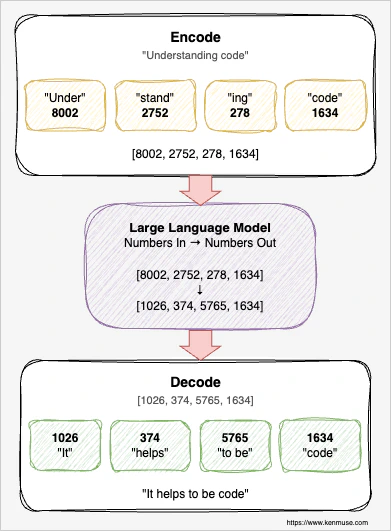
This makes tokens the fundamental unit of an AI interaction.
The context window: a fixed-size workbench
The context window is the total number of tokens the model can hold at once. It includes everything: your prompt, the system instructions, conversation history, file contents the model has read, tool outputs, and the model’s own responses. Modern models have large context windows – often 100,000 to over a million tokens – but bigger isn’t always better.
Imagine a physical workbench of fixed size. Everything the AI needs to reference must fit on this bench. Your project’s coding standards, the files it’s reading, the conversation you’ve been having, the output from that terminal command it just ran – all of it competes for the same limited space. When the workbench is tidy and contains only what’s relevant to the current task, the AI can find what it needs quickly and produce focused, accurate work. When the bench is buried under mountains of irrelevant material, things get lost.
This isn’t just an analogy. In practice, LLM performance degrades as the context window fills up. The model starts “forgetting” earlier instructions, missing important details, and making more mistakes. The Claude Code best practices put it directly: “LLM performance degrades as context fills” and identify the context window as “the most important resource to manage.” The same principle applies to GitHub Copilot and every other LLM-powered tool.
Progressive disclosure: loading knowledge on demand
Loading every possible instruction, coding standard, and reference document from the start wastes space and dilutes the signal. The model may give more weight to nearby content than to instructions buried earlier in the context. To avoid this problem, you use progressive disclosure – loading information only when it’s relevant.
In GitHub Copilot,
custom instructions load on every request. This is why the documentation consistently advises keeping them concise. They should be short enough that they don’t crowd out the actual work. If they only apply to specific files or folders, you should use applyTo so that they are not loaded unless they are relevant. Provide the details that always matter, and scope them whenever possible.
Agent skills use a different approach. Copilot loads only the skill descriptions at session start – like reading the titles on a shelf of reference books. If the LLM decides the skill is important for the current task, the full content is loaded. This keeps context clean until the knowledge is actually needed. That content then makes the LLM aware of more specific options so they can also be selectively loaded.
The key insight is that giving the AI the right information at the right time is far more effective than giving it all information all the time.
How tools shape the context window
When an AI agent uses tools – reading files, searching code, running terminal commands, calling Model Context Protocol (MCP) servers – the inputs and outputs of those tool calls go into the context window. Tools are often the biggest contributor to context bloat, so you want to be mindful of that and not include everything.
Let’s look at an example. You ask an agent to add a feature to an existing project. To understand the codebase, it reads five source files, searches for related patterns, runs a build command, and checks a test file for examples. Each tool call adds its request and results to the context. By the time the agent is ready to write code, it may have consumed thousands of tokens – and none of that accumulated context goes away. The original instructions may now be pushed far enough back that they lose their influence over the model’s behavior.
The Claude Code documentation calls this the “infinite exploration” anti-pattern: asking the AI to investigate something without scoping it, causing it to “read hundreds of files, filling the context.” GitHub’s best practices echo this by emphasizing well-scoped tasks with clear boundaries. Every tool call is powerful, but each one has a cost beyond just time – it’s a cost in context.
Why focused agents get better results
As you can see, a single agent trying to research, plan, implement, test, and review all in one session accumulates massive context from every phase. By the time it’s writing code, its workbench is cluttered with research notes, planning documents, rejected approaches, verbose search results, and exploration data. The instructions it received at the start? Buried under layers of intermediate work.
A focused agent starts with a clean context window. It loads only the instructions and skills relevant to its specialty. Its entire context budget is dedicated to doing one thing well. A custom agent defined as a “security reviewer” and restricted to specific read-only tools and minimal skills doesn’t waste context on implementation details, build outputs, or unrelated code. Its context starts with just enough to do one job and nothing more.
A powerful application of this principle is separating planning from implementation. A planning agent researches the codebase and produces a concise implementation plan with specific details about the focus. All of the other context – such as tool calls – is eliminated at the end of that session. Then a coding agent starts fresh with just the plan, the tools it needs, and the few files it needs to modify. Even better, each agent can now use a different model to optimize how it will do the work. The planning agent can use a thinking and reasoning model, while the implementation agent can use one focused on code generation.
This separation gives you a practical benefit, too: you get to review the plan before implementation begins. If the approach is wrong – if the agent misunderstood the requirements or picked the wrong architecture – you catch it before a single line of code is written. This saves time and tokens. With a single agent doing both planning and coding in the same pass, you typically discover problems only after the code is already generated and you’ve burned through context on an approach you’ll need to throw away. Even worse, if you ask the single agent to fix mistakes, that request now carries all of the earlier context.
Subagents: isolated context for parallel work
Subagents take the focused-agent idea one step further by providing additional context isolation. A subagent runs an agent in its own separate context window, does its work, and sends back a summary to the calling agent. The main agent’s context stays focused on the overarching goal.
Imagine you need to understand how authentication works across a large codebase before making changes. If the main agent does this research itself, it reads dozens of files, runs searches, and processes hundreds of lines of code – all of which fills the context window. By the time the research is done, there’s less room for the actual implementation work. With a subagent, you delegate the investigation to an isolated session. The subagent reads all those files in its own context, synthesizes the findings, and returns a concise report. The main agent gets the conclusions without the journey.
You can even dispatch multiple subagents in parallel. One investigates edge cases, another reviews for security concerns, a third checks how similar features are implemented elsewhere. Each works in its own isolated context, and the main agent synthesizes the results without any of that investigative overhead cluttering its workspace.
Context is the currency
Here’s how all the pieces fit together:
- Tokens are the atoms – every interaction has a measurable cost
- The context window is the budget – a fixed amount of working memory that determines how effectively the AI can operate
- Progressive disclosure manages spending – loading knowledge only when it’s relevant preserves context for the work that matters
- Tools and skills are powerful but expensive – every file read, search result, and command output consumes context, so you pay for what you use
- Focused agents maximize value – by keeping context clean and dedicated to a single concern, they produce better results and the ability to use specialized models
- Subagents provide isolation – they handle expensive investigation without consuming the main agent’s context budget
The reason custom agents and multi-agent workflows produce better results isn’t just organizational – it’s architectural. They work with the constraints of the technology rather than against them. A focused agent with clean context uses the same model, the same training, and the same capabilities as a generalist – but it produces better results because every token of context is working toward the task at hand.
If you take away one practical change from this article, make it this: start separating planning from implementation. Even that single step – having the AI create a plan you review before it writes code – can noticeably improve your results. You’ll catch wrong approaches earlier, save context for the work that matters, and get a clearer picture of what the AI intends to do before it does it.