Ken Muse
Sharing with Copilot using Agent Plugins
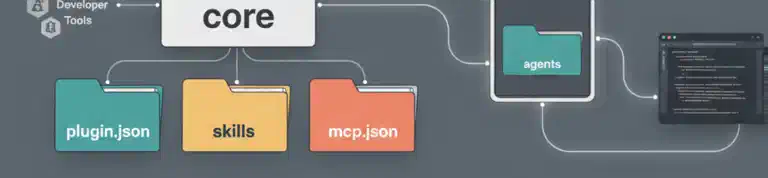
If you’ve built custom Copilot agents, skills, and MCP servers, you may know some of the benefits of using plugins to distribute this content. You may also know how quickly the setup starts to become complicated across AI harnesses. The new Agent Plugins specification gives you a portable core for shared skills and servers while keeping client-specific features in a cleaner, separate namespace. In this post, I walk through the new layout and show how to keep your reusable AI tooling portable without giving up the features that make each client worth using.

Read this article

Meet the Built-In Agents in GitHub Copilot CLI
Copilot CLI may feel like a personal assistant, but it is actually more like a team of specialists. If you provide the right prompt, you can have those specialists introduce themselves and describe how they can each help you to get more done.

Read this article

Make Agent Skill Scripts Load Efficiently in GitHub Copilot
Relative script paths look like the portable choice for an Agent Skill – right up until Copilot runs one from the workspace root and spends another turn recovering. A small SKILL.md convention can help the model resolve the real script path before execution, avoiding the failed call and making your skill load more efficiently.

Read this article

Isolating GitHub Copilot With Docker Sandboxes
Letting AI coding agent run autonomously with access to your network, your secrets, and your entire machine is risky. One rogue call is all it takes. One way to help protect yourself is to use microVM isolation to control the environment and what the agent can access. Docker Sandboxes is one such solution. I’ll walk you through setting it up and exploring some of its file system, network management, and monitoring capabilities.

Read this article

Guaranteed Copilot Context with Hooks
Ever set up a Copilot skill that worked perfectly – except when the model decided not to load it? Skills are optional by design; the model picks them up or it doesn’t. When you need context present every single time without exception, that’s a gap skills simply can’t fill. And that’s what hooks are for. I’ll walk through how to wire up a hook that fires automatically on every single prompt, injecting exactly the right context before the model sees your request – and when a session-level hook makes more sense instead.

Read this article

Dynamic Instructions for Copilot
Ever written a Copilot skill that started clean – then became a sprawling mess of conditionals as you define how to work with different versions of some product? You’re not alone. I’ll show you how a tiny wrapper script can detect your environment and hand Copilot only the instructions that actually apply, keeping your skills small and your model focused. I’ll also unpack the supply-chain security question this technique forces you to take seriously.

Read this article

Decoding Copilot Token Costs Using VS Code
Ever wondered exactly how much a single Copilot chat request actually costs? VS Code already logs the precise breakdown for every model call … if you know where to find it. In this post, I crack open one real log entry and walk through the math step by step so you can read your own usage data with confidence.

Read this article

Why Your Copilot Instructions Don't Need a Folder Map
Ever spent time carefully documenting your project’s folder structure in a copilot-instructions.md file? You’re not alone – it’s one of the most common things developers add. But here’s the thing: VS Code’s Copilot extension already injects a workspace tree into every conversation automatically. And when that tree gets truncated, the LLM has tools to explore further on its own. In this post, I’ll show you what’s happening under the hood so you can spend those instruction tokens on things that genuinely matter.

Read this article

Understanding Agentic Memory in GitHub Copilot
Every conversation with AI starts from scratch – no memory of yesterday’s debugging session, your team’s naming conventions, or the architectural decision you patiently explained three times last week. Agentic memory changes that. It gives AI assistants the ability to accumulate knowledge over time, turning them from stateless tools into collaborators that genuinely improve. In this post, I’ll walk you through the different types of memory and show you how VS Code and GitHub Copilot put these ideas into practice today.

Read this article

Workspace vs Worktree Isolation in Copilot CLI
Ever wish you could run multiple Copilot CLI agents at once without turning your repo into chaos? I ran into that exact challenge while trying to juggle parallel tasks. I’ll show you when to use workspace versus worktree isolation, how to review and merge agent changes safely, and how to clean up so your workflow stays fast and tidy.

Read this article